Your mistakes, counted per page
Get an in depth breakdown of exactly how many and type of mistakes you're making per lesson.


The student portal
Most online Qur’an classes end when the call does. See what makes Inaabah different from the rest.
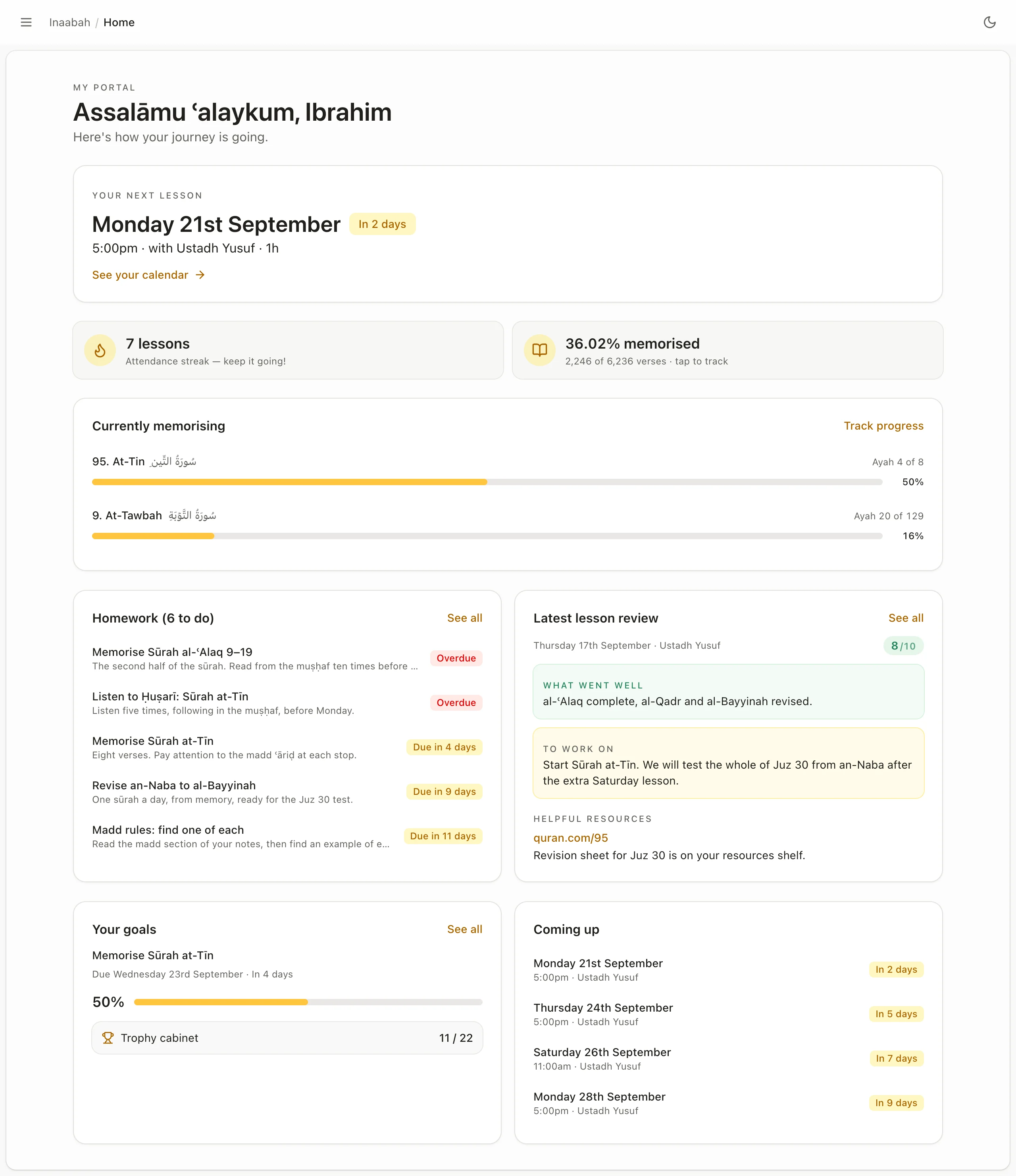
Your home screen
When your next lesson is, and how you did in your last one.
Exactly how much of the Qur’an you have memorised, and what you’re currently memorising.
Your homework & assignments, and when each one is due.
How well you’re doing with your targets, and the trophies you’ve earned so far.
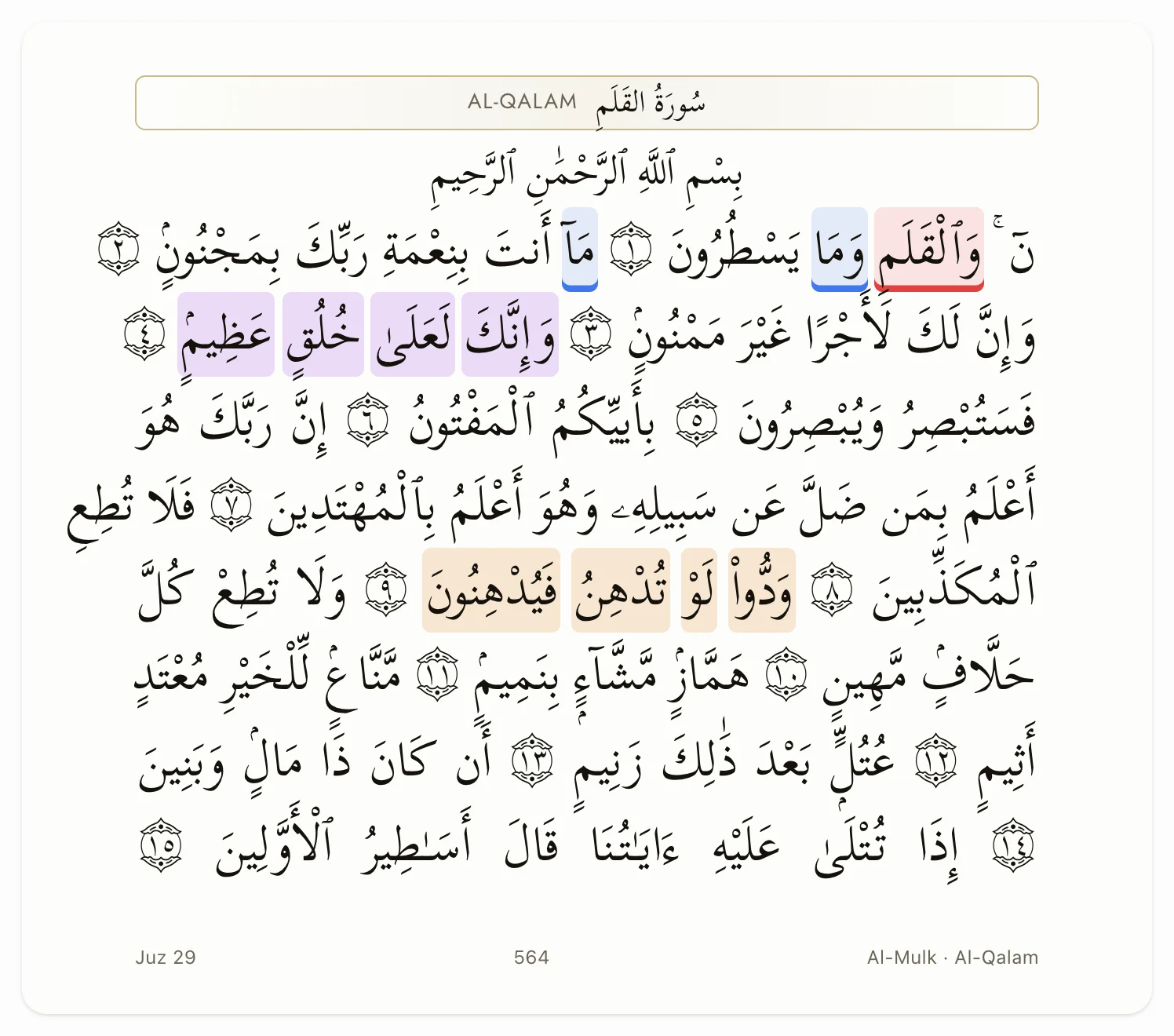
01 · In the lesson
Your teacher marks your own copy of the muṣḥaf, right down to the word, so you can see exactly where you made mistakes.
All 604 pages, in Uthmani, Madani print or Indo-Pak script.
Mistake, revise, memorised, tajwīd note, favourite.
A surah, an ayah, a page, a juz, or even a few words in Arabic or English.

02 · After the lesson
A score out of ten, what went well, what to work on, and the homework to do throughout the week.
Neither yours nor your teacher’s. Have an exact look at how you're doing in your lessons over any period of time.
The same report gets sent to the parent by email after every lesson for you to track your child's progress.
A comprehensive overview of scores, attendance, and homeworks each month.

03 · Between lessons
Record your recitation in the portal and hand it in. No files to find, nothing to send over WhatsApp.
Your teacher listens, writes what to fix, and records how it should sound.
So you can compare your new attempts with old mistakes.
So you can stay on top of your work and know when you're falling behind

04 · Over the months
You might not be sure that you're actually improving. The portal keeps the evidence.
Get an in depth breakdown of exactly how many and type of mistakes you're making per lesson.
Read the same page each month so you get audible proof of your fluency improvements over time.

All 29 letters and each rule of tajweed, marked according to how well you apply that rule.


Tick off a juz, a page or a single ayah. Trophies mark the milestones on your Hifth journey.


A juz, a surah or a number of verses, automatically counted from your memorisation tracker as you learn more.
Break each goal down into clear, identifiable steps.
Keep a streak, and look at how you're doing over the week, month and year at a glance.
Private, unless you choose to share a goal with your teacher, so they can help hold you accountable and keep you motivated.


And the everyday things
You'll get access to the whole portal, regardless of your course.
One button to join, pinned to the top of the page.
Every lesson in your own time zone, added to your phone’s calendar in one tap.
Worksheets, recordings and videos your teacher sets for you, besides an Inaabah library everyone shares.
All your information is stored and registered safely, with strict privacy rules in regards to your data.
Use the portal on your phone, tablet or laptop, in any browser. Nothing to download.
The portal comes with your place, whether you're in group lessons or one-to-one.
“Not only that but the portal helps a lot. If you are looking to perfect it the portal definitely will improve your reading by looking back at the notes and really understand them.”
No. It comes with your place, whichever course you are on and whether you learn one to one or in a group. There is no place at Inaabah without it.
No. The portal opens in the browser on your phone, tablet or laptop. You sign in with the login we give you when you join.
A written report reaches you by email after every lesson, with a score out of ten, what went well and what to work on, and a fuller progress report follows each month.
Yes. The memorisation tracker is one part of it. The lesson reports, your teacher’s marks on the muṣḥaf, the recorded homework and the tajweed/letter map are useful for whatever you are learning, even if you're starting completely from scratch.
Your teacher and your teacher only. Recordings are kept on private storage and can only be opened by signing in.
Yes. Sign in on your phone, tablet or laptop, in any browser – your progress is tracked across your devices.
Yes. Each student is walked through their portal upon enrolment so they know exactly how to use it best.
Yes. Every lesson report stays in the portal, along with your recordings and your teacher’s corrections. You can review past lessons whenever you want.
Your first lesson is free, and the plan you leave with is yours to keep.